Download the ads you're already looking at.
You're already on the Meta Ads Library. Tick the ads worth keeping and they come down as one ZIP: every image, every video, and a spreadsheet with all the copy in it. Google's Ads Transparency Center works the same way. We don't count how many you take.
Still alpha. It runs in your browser and nothing is uploaded. You need no account to try it.
- nike_2026-08-17_1062639122807811_v1.mp4672 KB
- nike_2026-08-19_1706703923913063_v1.jpg184 KB
- ads.xlsxevery ad's copy
Filenames you can still read in three months
Advertiser, the date it started running, the Library ID, which version. Open the folder next quarter and you can still tell what you are looking at. Try that with sixty files called IMG_2931.jpg.
- nike_2026-08-17_1062639122807811_v1.mp4672 KB
- nike_2026-08-17_1062639122807811_v2.mp4852 KB
- centro-shoes_2024-07-10_401628546357010_v1.jpg176 KB
- flipkart_2026-07-13_1725806052073781_v3.jpg91 KB
- flipkart_2026-07-13_1725806052073781_v3-2.jpg88 KB
- flipkart_2026-07-13_1725806052073781_v3-3.jpg95 KB
- mamaearth_2026-09-02_1188402215573604_v1.mp41.4 MB
Prefer another order? Settings has other name patterns, such as ID first or date first.
The copy comes too
Every ad brings its text with it, in columns you can sort and filter. The hook, the headline, the button, where it points.
Twenty-nine columns in all. A carousel becomes one row per card, so you can read a whole creative test top to bottom. Hindi, Arabic and emoji survive the trip into Excel, which took us longer to get right than we would like to admit.
What each library will actually give you
Images, videos and every version
Search by brand or keyword from the popup. Filter by country, media type, status. Then let it load results at roughly the speed a person would scroll. Carousels and multi-version tests keep every variant as its own file.
Images, and honest gaps
Image ads come down as files. Video ads do not, because Google's transparency pages never serve the video. You get the YouTube link and the thumbnail, marked as such. Text ads only exist as a picture on Google's side, so a picture is what you get. We would rather label a gap than quietly fill it in.
Three steps, and you keep your tab
Search from the popup
Pick a library, type a brand or a keyword, set whichever filters you want. It opens the library's own results page. The same page you would have opened yourself.
Pick the ads
Every card gets a Download button, a Select box and Copy text. Want more than the first screen? Press Load all results and let it scroll until the library runs dry.
Download once
Everything you ticked comes down at once into a single ZIP. Big jobs split into parts rather than falling over. Our largest test run was 1.89 GB and arrived in three parts with nothing missing.
This is all of it
Three screenshots from a live Ads Library search. There is no fourth screen, and no dashboard anywhere to log into.
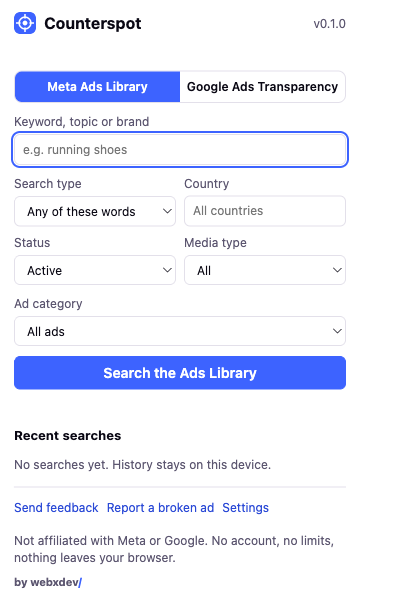
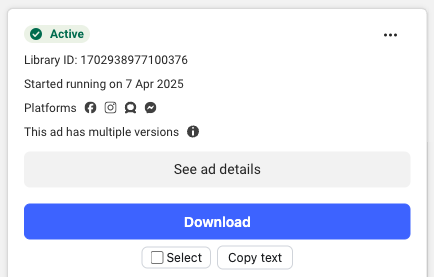
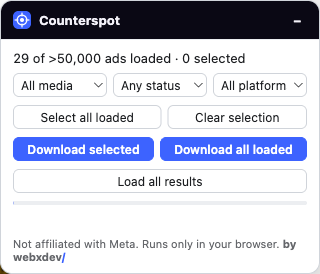
What it doesn't do
Most tools in this category go quiet about their limits. Here are ours, before you spend anything.
- Not affiliated
- We are independent. Not affiliated with, endorsed by, or connected to Meta Platforms, Inc. or Google LLC.
- Only what's public
- It reads the same public libraries you can open yourself while logged out. Nothing behind a login, and no account of yours is involved.
- No video from Google
- Google's transparency pages do not serve the video file at all. You get the YouTube link and the thumbnail, marked as such in the sheet.
- Some ads have no file
- Some third party HTML5 creatives have nothing downloadable behind them at all. Those ads still show up in the sheet with a note saying why. We do not drop them quietly.
- Alpha builds expire
- Tester builds stop at the end of the testing period and tell you so on the page. A key belongs to one person, and we can see which browsers have used it.
Get the tester build
We send builds out one at a time. You get a build for your browser, a key, and our actual email address for as long as you are using it. Tell us roughly what you would use it for.
Chrome, Edge, Brave and Arc all take the same ZIP. Firefox gets its own add-on, signed by Mozilla, so it stays installed when you restart. Pricing covers what it costs once the trial ends.