Alpha, by invitation. Builds go out one person at a time. Ask for one
Counterspot
Guides

Three guides, ten minutes total.

Enough to get it installed, run a real download, and understand what every column in the sheet is telling you.

5 minutes

Installing the extension

Chrome and Firefox, step by step, and what to do with the key we send you.

3 minutes

Your first download

From typing a brand in the popup to a ZIP on your disk, including what Load all results is actually doing.

4 minutes

Reading the spreadsheet

What each column means, why one ad can turn into six rows, and how to open the file without mangling non-Latin text.

Before you start

The three screens you will use
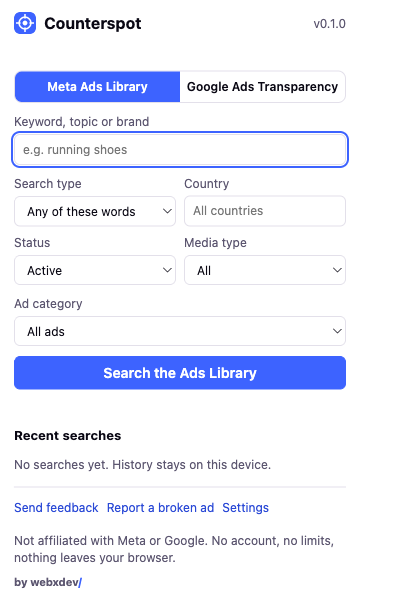
The extension popup: a search box, filters for country, status, media type and ad category, and a Search the Ads Library button.
The popupType a brand, set the filters, press search. Recent searches stay on your machine.
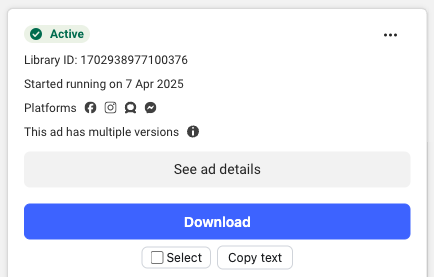
A Meta Ads Library card showing its Library ID and start date, with the extension's Download, Select and Copy text row added underneath See ad details.
On every cardDownload, Select and Copy text, tucked under the library's own See ad details link.
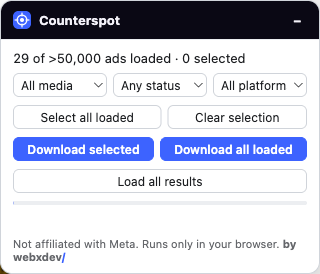
The extension toolbar reading 28 of about 2,084 ads loaded, 0 selected, with media, status and platform filters and buttons for Download selected, Download all loaded and Load all results.
The toolbarA running count, filters that keep your selection, and Load all results for the rest.
Next

See it on your own searches

Ten days with everything unlocked, and we do not ask for a card. Say which browser you use and we will send a build and a key.